
Open your CRM, open a customer's record, tap Call now, write one or two sentences about what the call is for, and tap Call. Your agent dials from your verified business number with the customer's full record in mind. When the call ends, the recording, transcript, summary and outcome are saved on that record — and emailed to you. Each outbound call costs exactly one credit ($1). US and Puerto Rico numbers only.
Follow-up calls are where small businesses quietly lose money: the list lives in someone's memory, the calls never happen, and when they do happen there is no record of what was said or promised. Owners told us they wanted to see, in plain steps, exactly how an outbound call works in CallPages CRM — where to tap, what happens next, and what it costs — before trusting an agent with their customers.
# How to make an outbound call from your CallPages CRM — step by step
This guide shows you, tap by tap, how to make your CRM call a customer for you. No technical words. No skipped steps. If you can send a text message, you can do this.
You will use a made-up example: a dental clinic, Vega Family Dental, calling a customer, Marisol. Everything works exactly the same for your business and your customers.

Your CRM can now call your customers for you — from your own number, with their full record in mind.
Before you start — four things to check
- You have a CallPage. It is free, and it takes minutes. If you do not have one yet, get your free CallPage first, then come back to this guide.
- You are on CRM Premium ($29/month) — that is what unlocks outbound calling. Just want to see how it feels first? Every free account can make up to 3 test calls to your own phone number, free, and see the full record they leave behind.
- Your customer is in your CRM, with their phone number. If they are not there yet, add them in the CRM (or import your list) before you start.
- You have call credit. Every outbound call costs exactly 1 credit = $1, taken from your page's prepaid balance. You buy a package of calls on the CallPages CRM page — 1, 5, 10, 25, 50 or 100 calls, always $1 each — and the calls sit in your balance until you use them. Nothing is ever charged to your card automatically.
One more rule, so there are no surprises: today we call United States and Puerto Rico numbers only. If a customer's number is from somewhere else, the call is stopped before dialing — and you are not charged for it.
Part 1 — Call one customer
Step 1 — Sign in to CallPages
Go to callpages.me and sign in the way you always do. You land on your dashboard — the home screen for your pages.
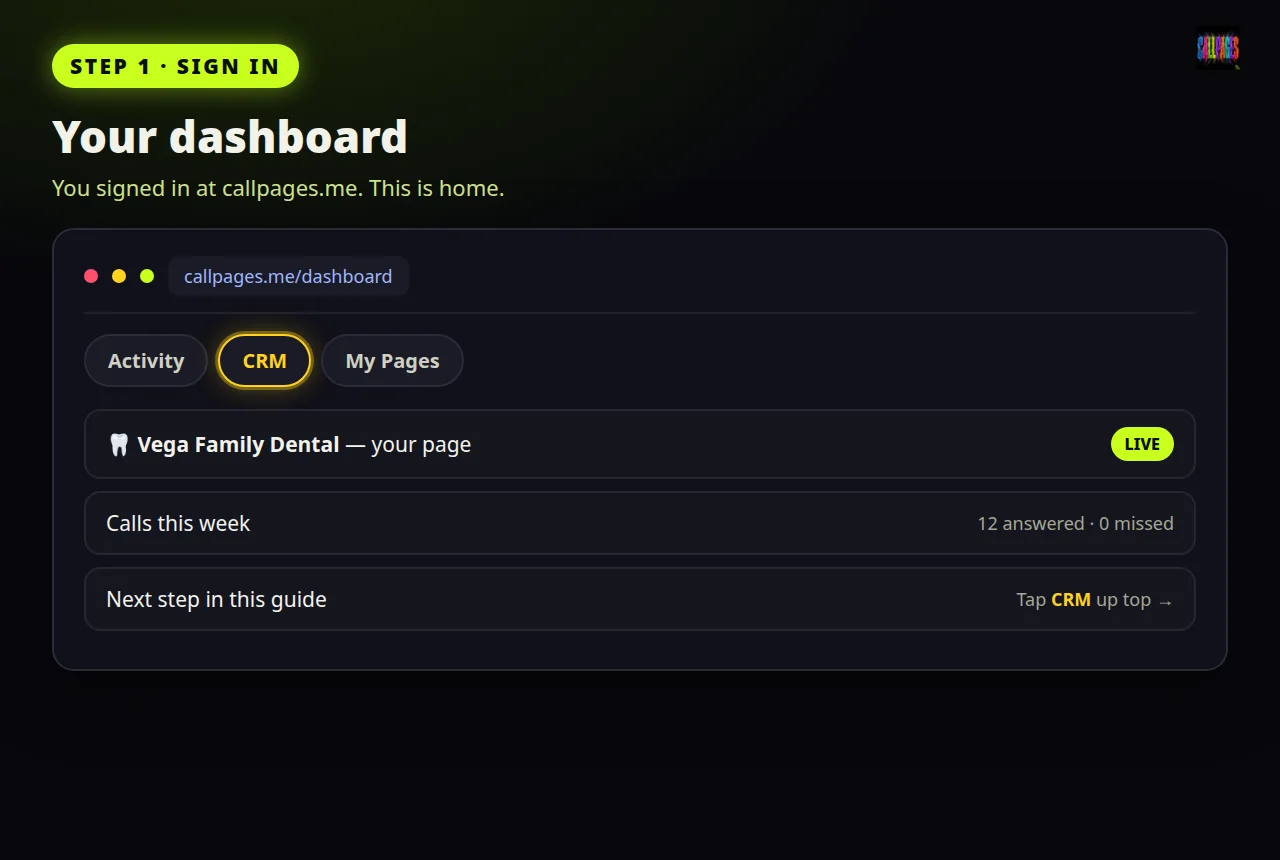
Step 1 — Sign in and you are on your dashboard.
Step 2 — Open the CRM, then the Sales tab
Tap CRM. Then tap the Sales tab. This is where your customers live — every person your business knows, one record each.
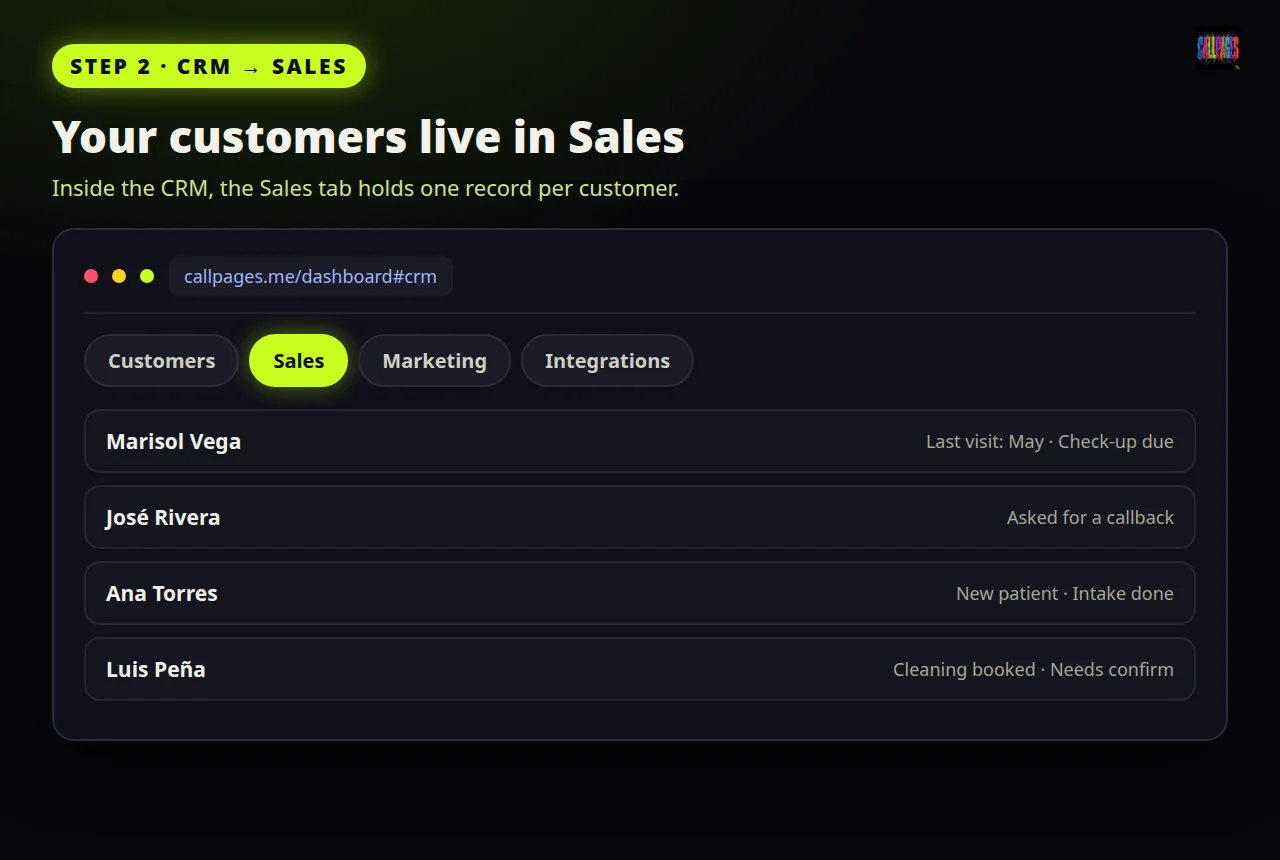
Step 2 — CRM, then Sales: your customers live here.
Step 3 — Find your customer
Type the customer's name into the search box at the top of the list. (Scrolling the list works too — search is just faster.) Your customer appears.
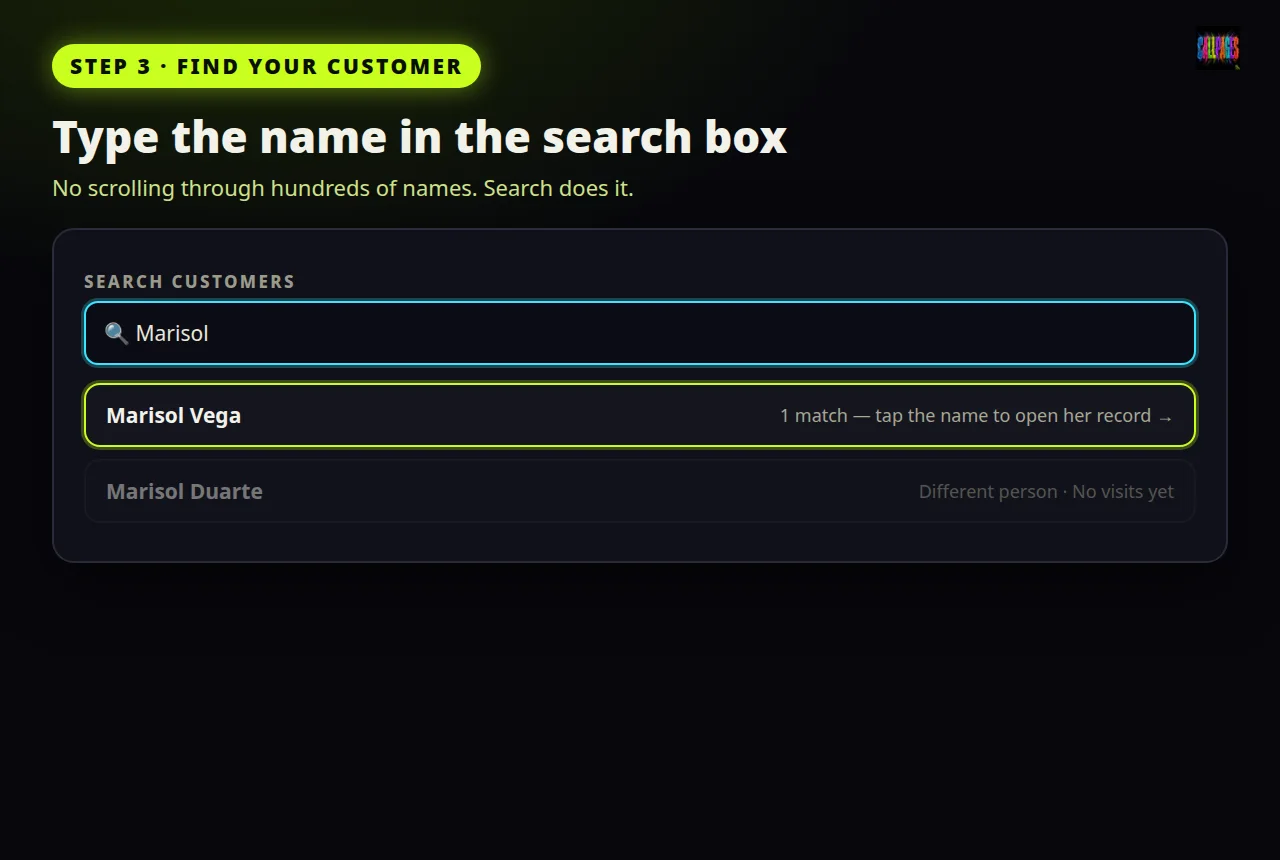
Step 3 — Type the name. Your customer appears.
Step 4 — Open their record
Tap the customer's name. Their record opens: phone number, what they bought, past calls and messages, appointments — everything in one place. This is the same record your agent will read before it speaks, so give the phone number a quick look: if it is wrong, fix it now (Edit, correct the number, Save).
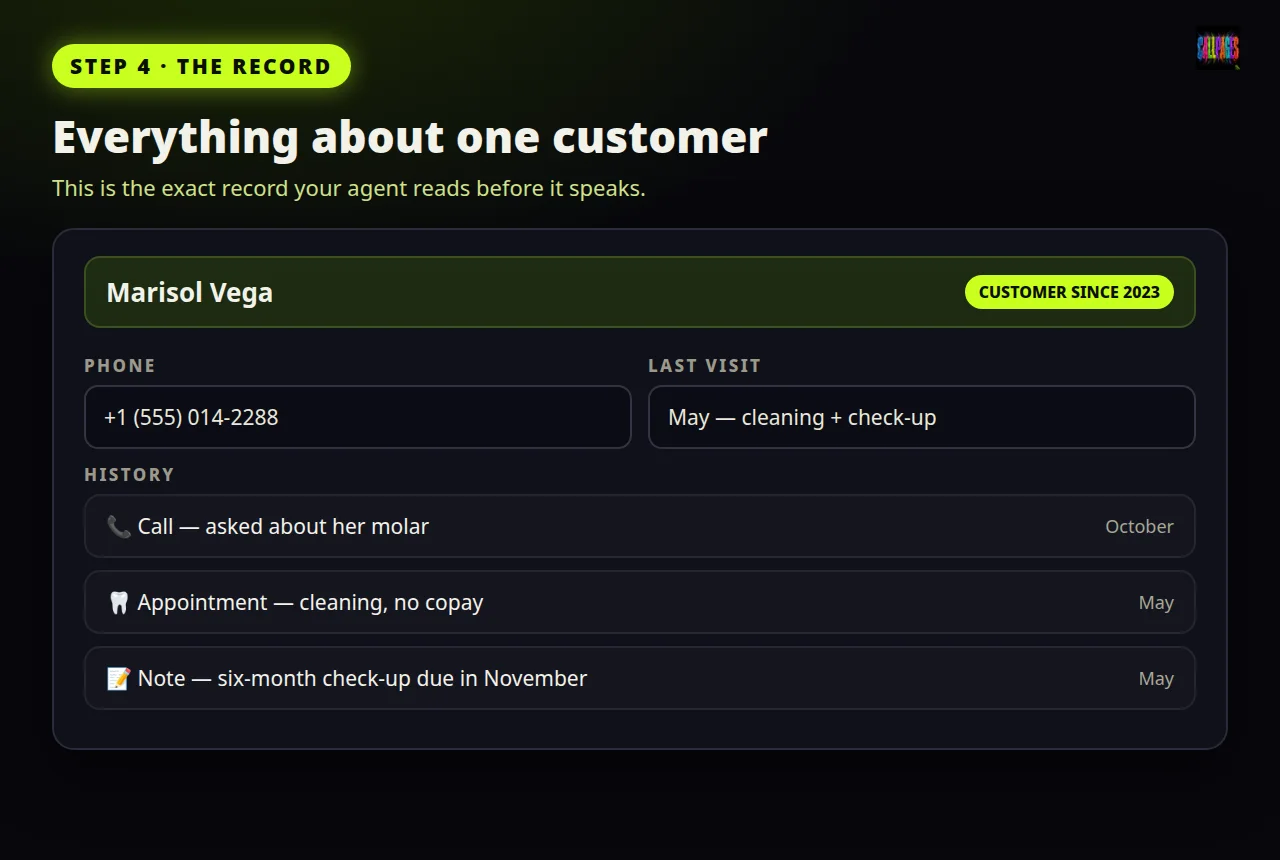
Step 4 — The record: everything you know about this customer, on one screen.
Step 5 — Find the Call now button
On the record you will see a 📞 Call now button — and, next to it, your call balance: how many prepaid calls you have left. If your balance says 0, buy a package first on the CRM page; without credit, the button will tell you exactly that instead of guessing.
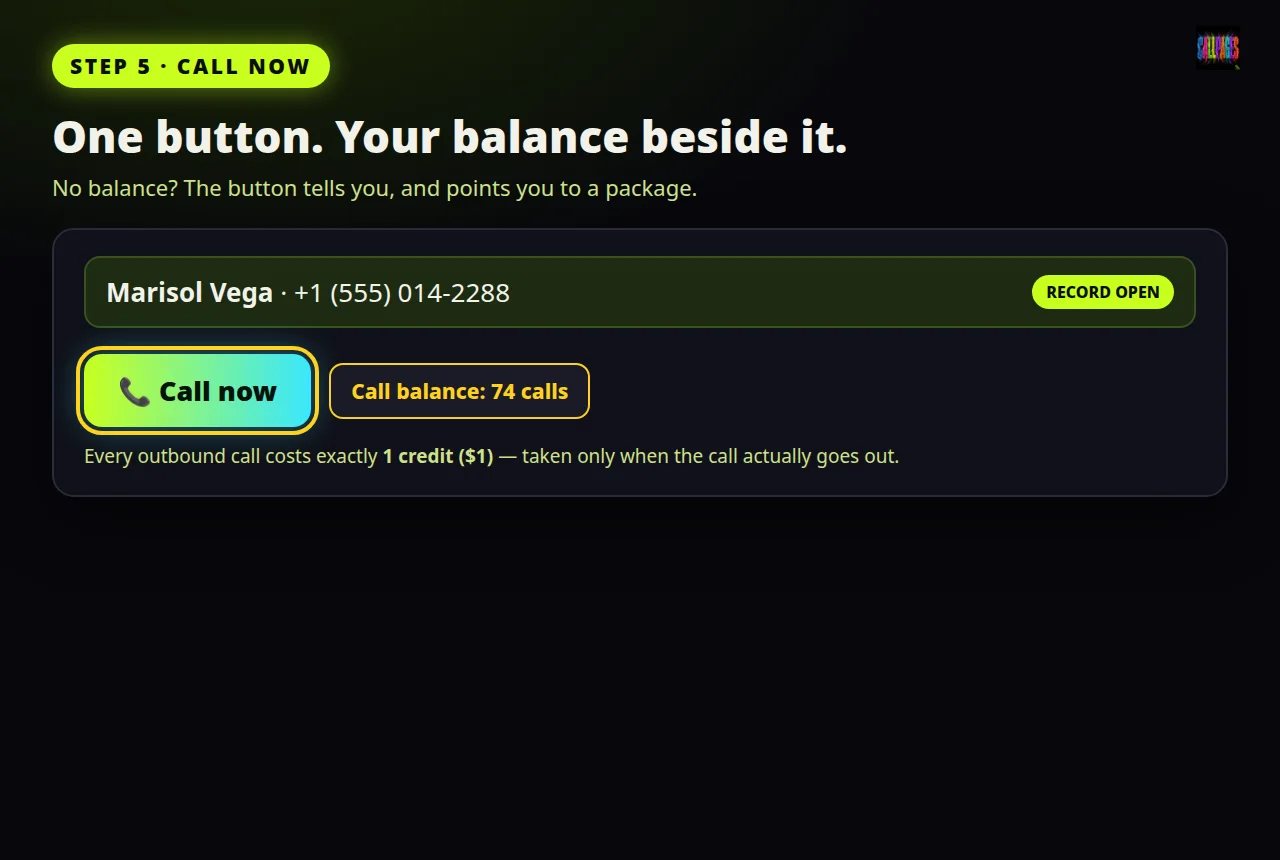
Step 5 — The Call now button sits right on the record. Your balance sits next to it.
Step 6 — Write what this call is for
Tap 📞 Call now. A box opens with one question: what should the agent do on this call? Write it in your own words, like you would brief a good employee. One or two sentences is enough. For Marisol, the clinic writes:
"Remind Marisol her six-month check-up is due. Offer Tuesday morning, and book the appointment if she says yes."
The agent also reads the customer's whole record before calling — her last visit, what was promised, what is pending — so you only need to write what is special about this call.
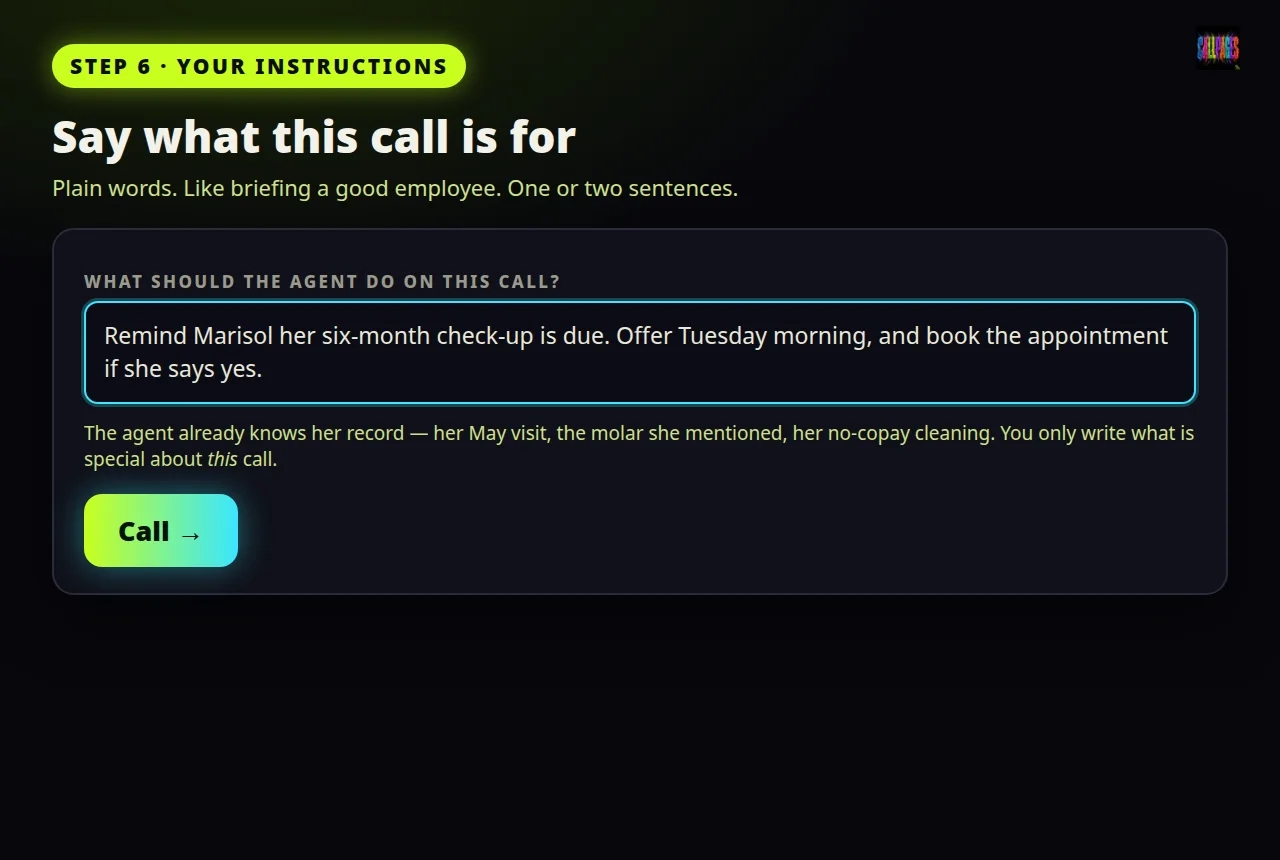
Step 6 — Say what the call is for, in your own words. One or two sentences is enough.
Step 7 — Tap Call
Tap Call. That is the whole job. The call goes out right away, and exactly one credit leaves your balance — because the call actually went out. If a call cannot be placed at all (a broken number, or a number outside the US and Puerto Rico), it is stopped before dialing and you are charged nothing.
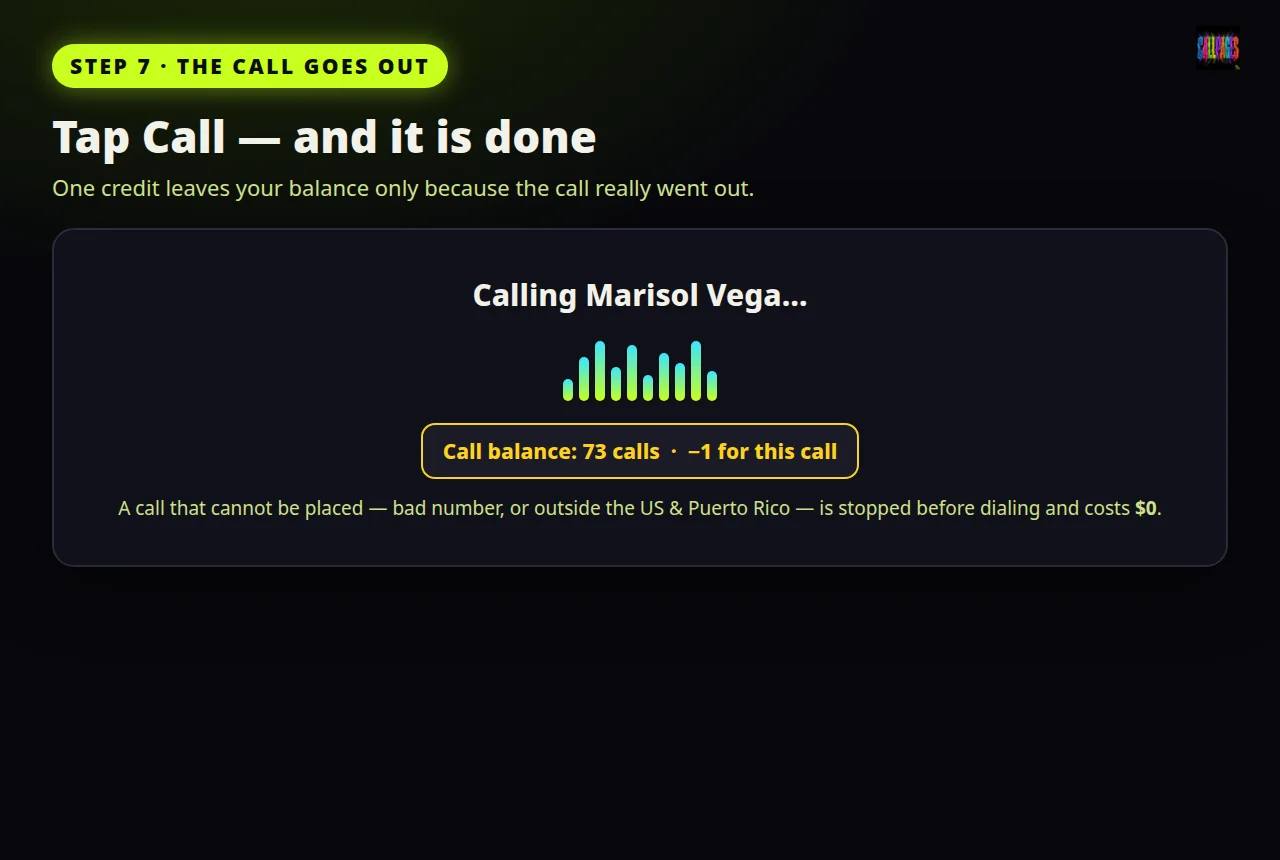
Step 7 — Tap Call. One credit is deducted — only because the call actually went out.
Step 8 — Your customer sees YOUR number
Put your phone down — your work is done. Your customer's phone rings, and the number they see is your own business number, never a strange call-center number. That matters: if they miss the call, they can call or text you right back, like always.
While the agent talks, it listens, answers questions with your real prices and policies, and works toward the goal you wrote — including booking the appointment inside the call. Want to hear it live? Open the record during the call and you can listen in, and even join as a participant if the moment needs a human voice.
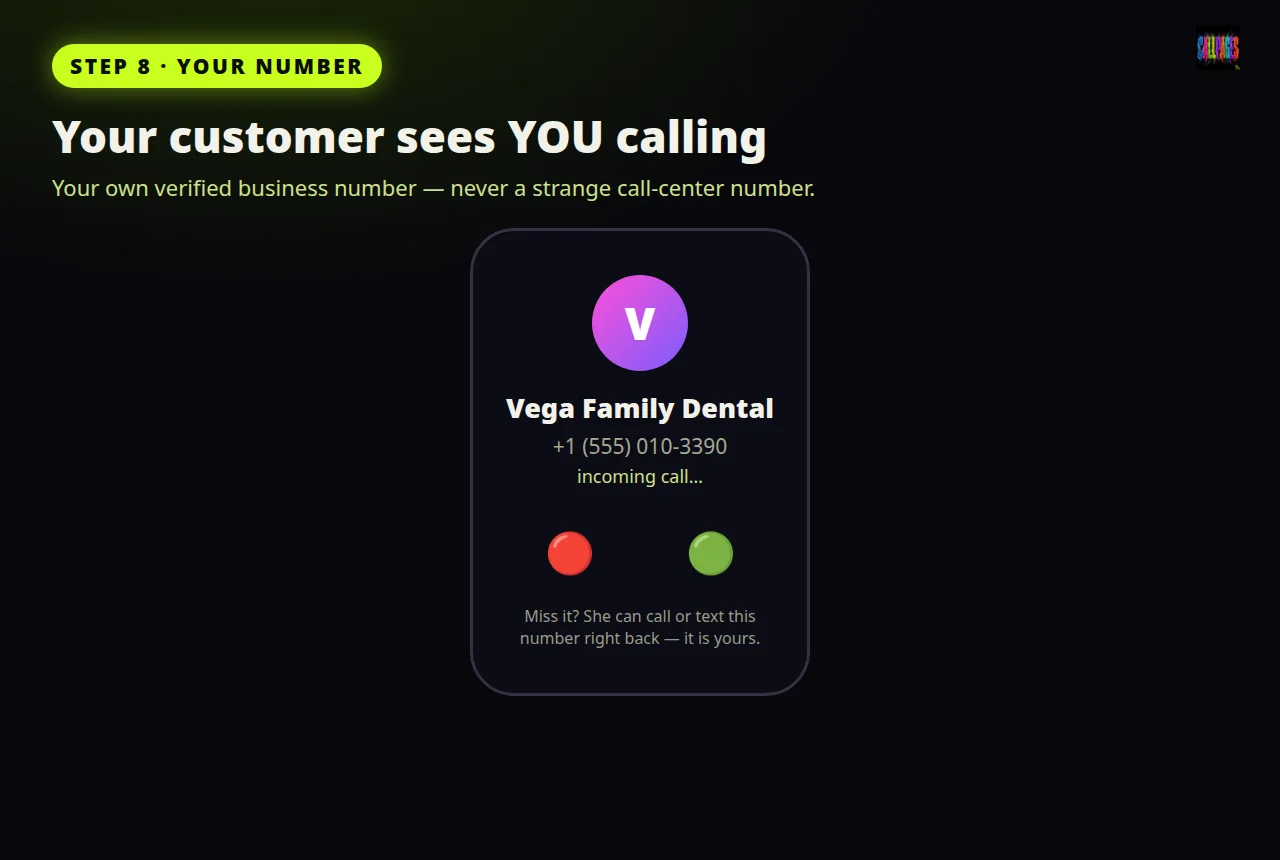
Step 8 — Your customer sees YOUR number. They can call or text you right back.
Step 9 — Open the record again
When the call ends, go back to the customer's record (CRM → Sales → their name). The call is already there, in their history, with its outcome written in plain words — for Marisol: Appointment booked, Tuesday 10:30 AM.
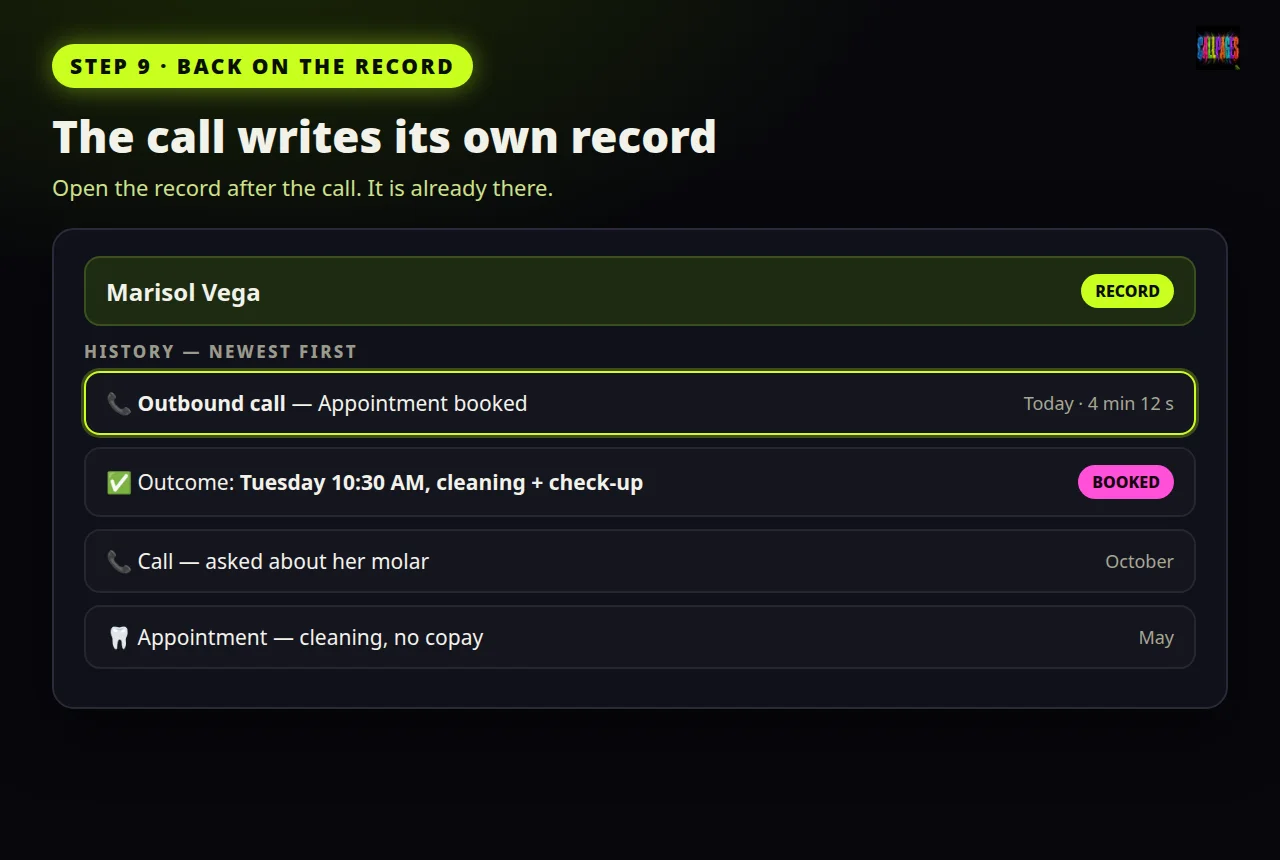
Step 9 — The call lands back on the record, with its outcome written in.
Step 10 — Read it, or listen to it
Tap the call in the history. Now you can do three things, your choice:
- Read the summary — the short version: what was asked, what was agreed.
- Read the transcript — every word, both sides.
- Press play — hear the actual recording.
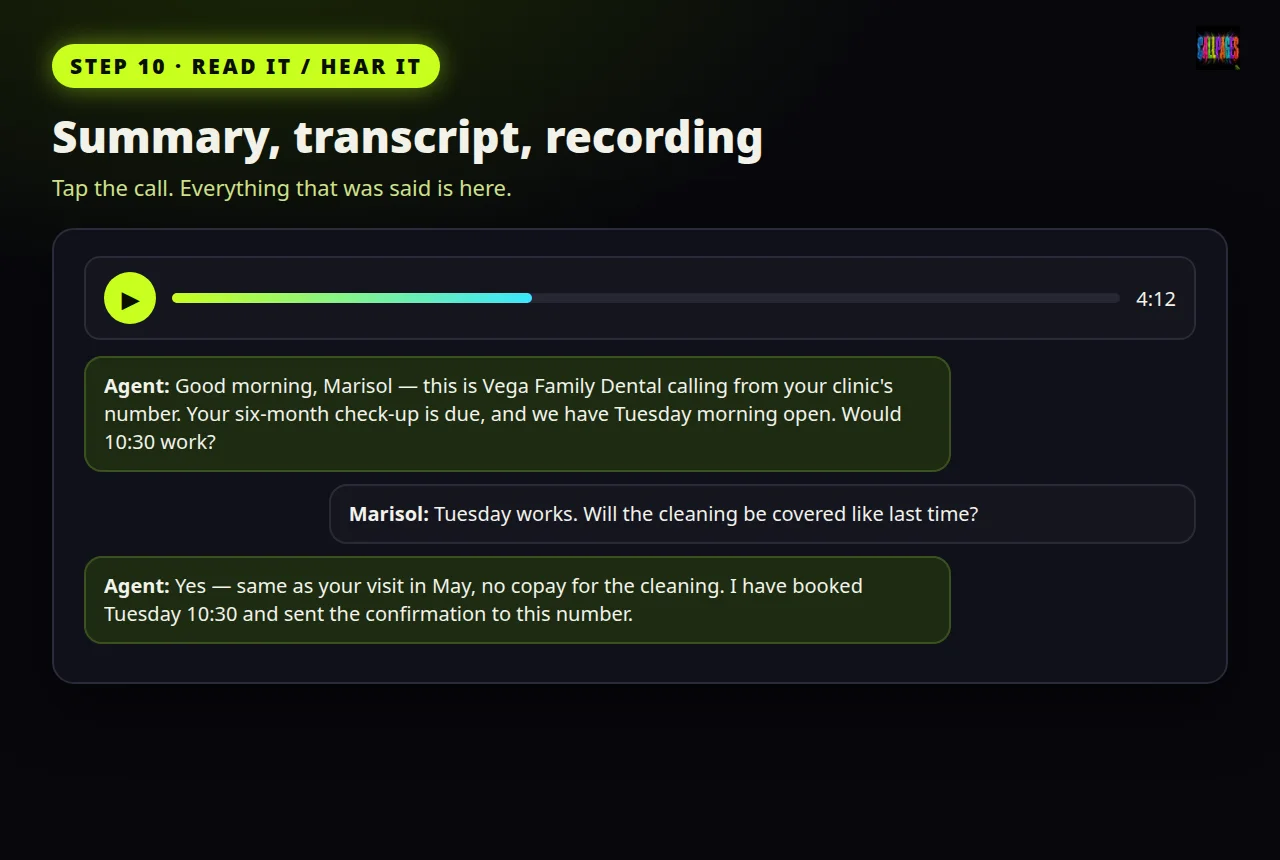
Step 10 — Read the summary, read every word, or press play and listen.
Step 11 — Check your email
The same summary is also sent to your email: the time, how long the call lasted, what happened, and the outcome. So even if you never open the CRM again that day, the result of every call finds you.
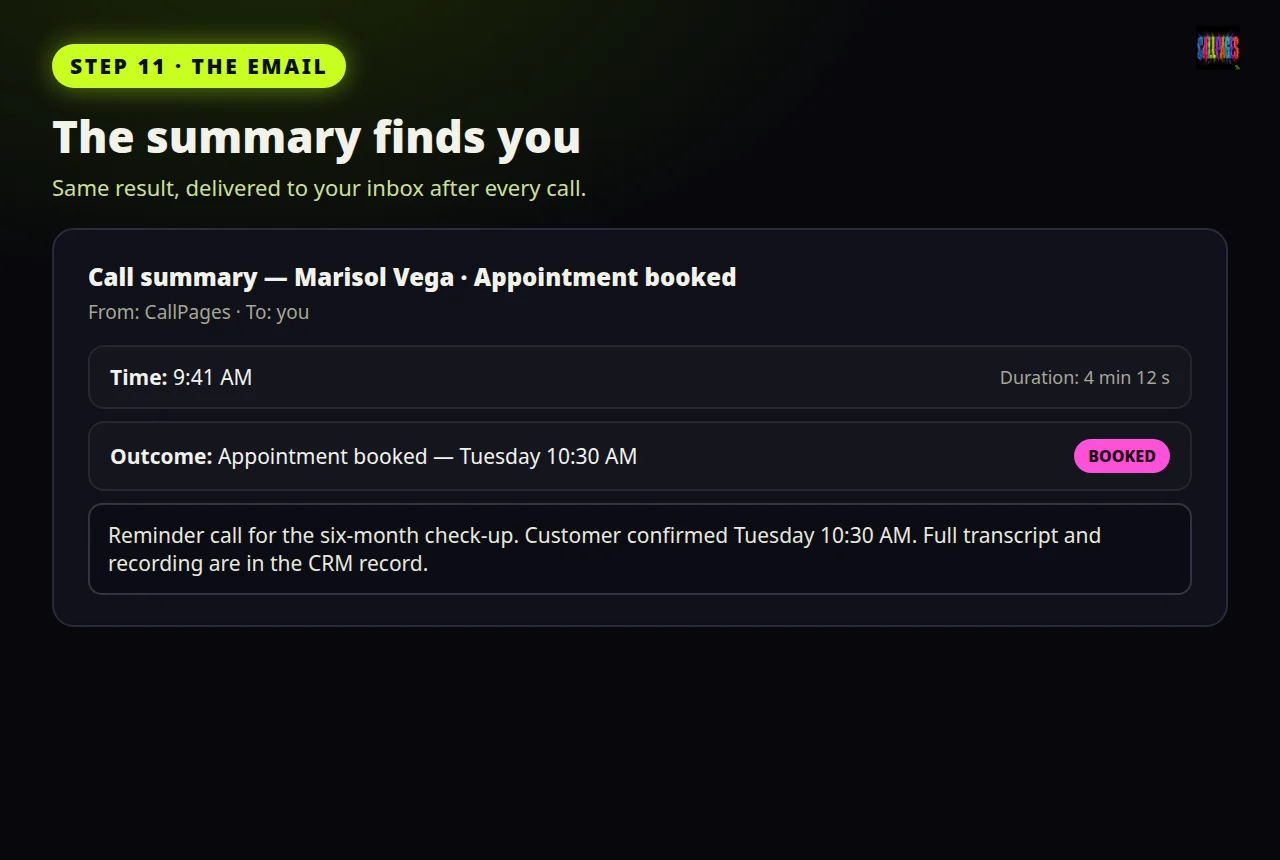
Step 11 — The same summary arrives in your email.
That is one call, start to finish. Eleven steps the first time — and steps 1 to 4 become muscle memory within a day: open, find, tap, write, call.
Part 2 — Call many customers at once (call blocks)
One call is good. A whole list — reminders, follow-ups, people who asked for a callback — is where this earns its keep. A call block is a list of customers called one by one, all working toward one goal you set. Here is every step.
Block step 1 — Get the proposed list
Go to CRM → Sales → Call blocks and start a new block. We propose who to call, picked from what your CRM already knows — who is due, who asked for follow-up, who went quiet. You did not have to build this list by hand.
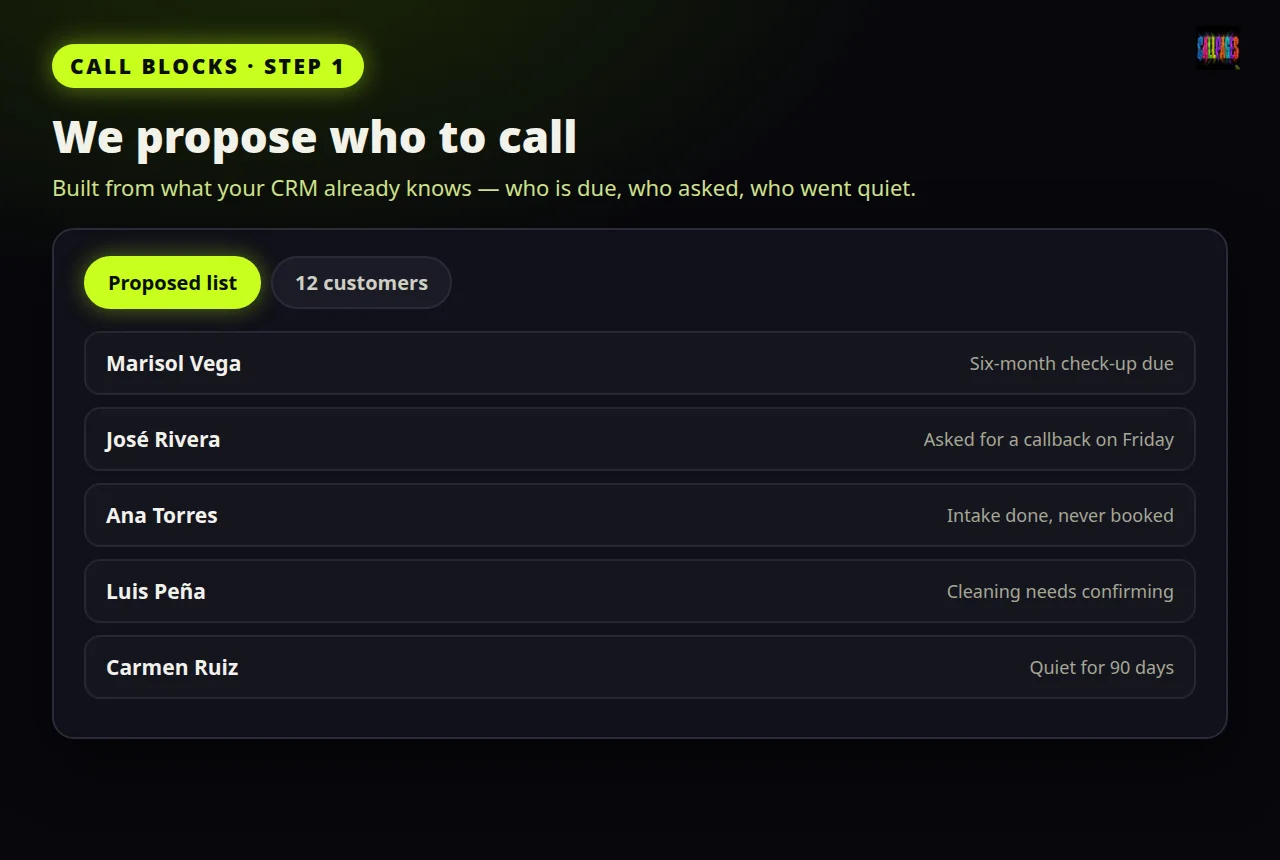
Call blocks, step 1 — We propose who to call, from what your CRM already knows.
Block step 2 — Fix the list, write one note
Look the list over. Remove anyone who should not be called. Add anyone who is missing. Then write one note for the whole block — the goal every call works toward. For the clinic: "Six-month check-up reminders. Offer Tuesday and Thursday mornings first." That is the only writing the whole campaign needs.
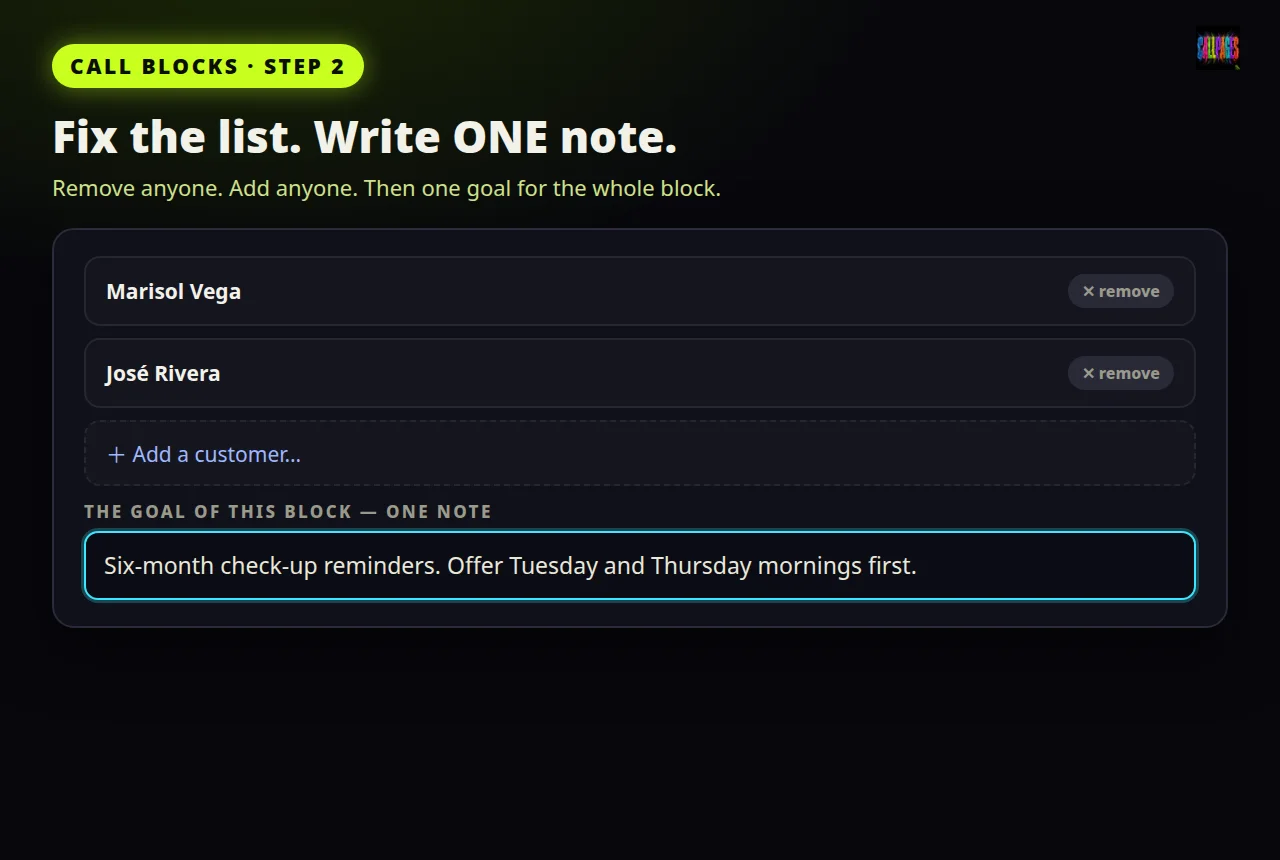
Call blocks, step 2 — Fix the list, then write ONE note: the goal of every call in it.
Block step 3 — (Optional, smart) Rehearse the call
Want to hear how the call will sound before real customers do? Role-play it with us first: you give any extra direction — a tone, a thing to never say, a special offer — and it is folded into the calls' instructions before a single real call goes out. Optional, free, and it has saved more campaigns than any other step.
Block step 4 — Check the math, then start
Count the names: that is exactly how many credits the block needs — one per person. If your balance is short, buy a package first; the block will not start half-funded and surprise you later. Then tap Start calls. The calls go out one by one, each from your verified business number, each with that customer's own record in mind — not a robot blast, a sequence of real conversations.
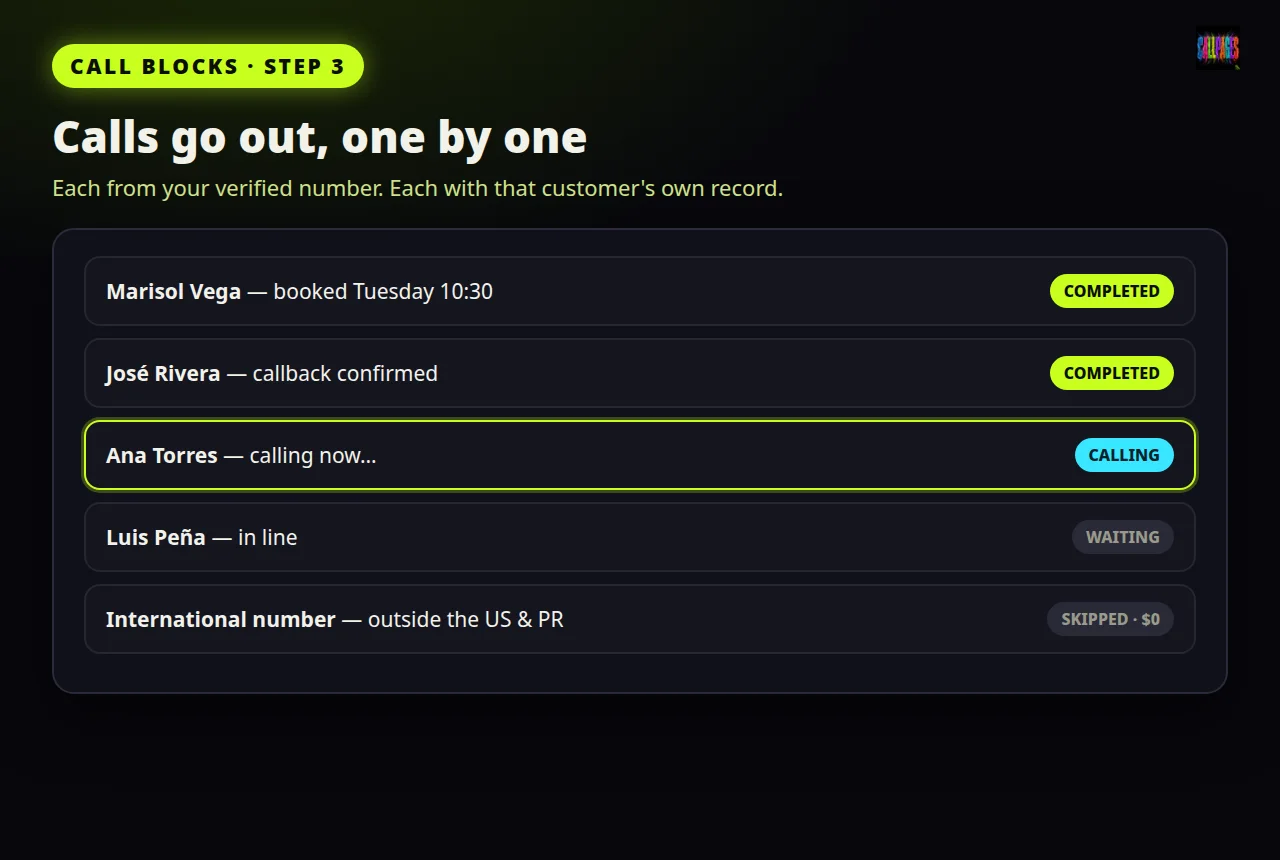
Call blocks, step 3 — Calls go out one by one. Every name shows its result.
Block step 5 — Read the results where they live
As calls finish, each name in the block shows its result — completed, failed, or skipped, with the reason written next to it (a number outside the US and Puerto Rico is skipped, never dialed, never charged). Tap any name and you are on that customer's record: recording, transcript, outcome — the same full trail as a one-by-one call.
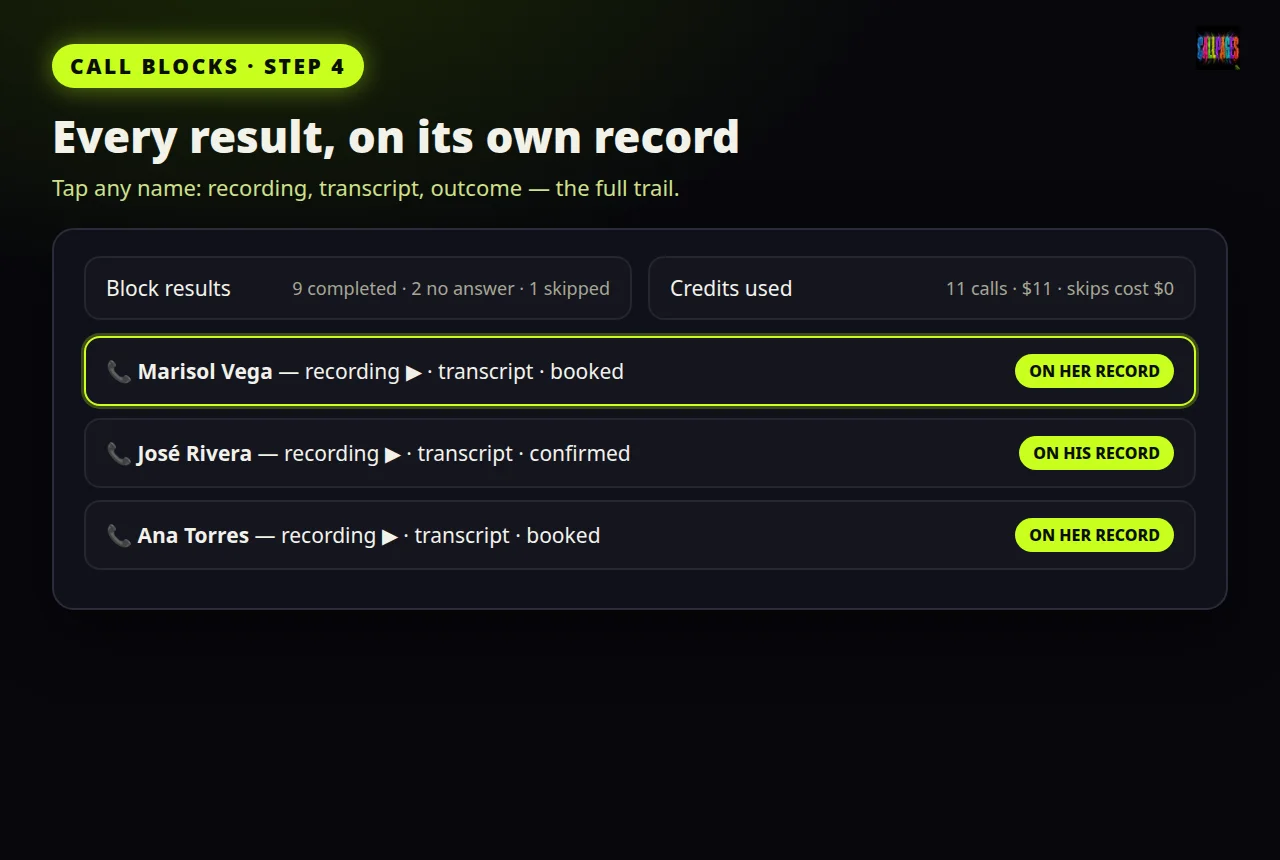
Call blocks, step 4 — Every result is saved on its own customer record.
What it costs — the plain rules
| What | Price | |---|---| | Your CallPage | Free, forever | | Test calls to your own number | Free (up to 3, with full records) | | CRM Premium | $29/month — unlocks outbound calling | | Outbound calls | Exactly $1 per call, prepaid packages of 1 · 5 · 10 · 25 · 50 · 100 | | Incoming-call packages | From $0.16 per call — 20/$5 · 50/$10 · 100/$18 · 250/$40 |
- Prepaid means prepaid. The credit sits in your page's balance. A call deducts exactly $1 when it goes out. No per-minute meters, no surprise bill, nothing auto-charged.
- A call that cannot be placed costs nothing. Wrong number, or outside the US and Puerto Rico — stopped before dialing, $0.
- Every page has its own balance. Calls for one business never spend another business's credit.
Questions everyone asks
Who is actually calling my customer? Your CallPages agent — the same voice platform that answers your page — speaking with your customer's full record and the instructions you wrote for that call. It listens, answers questions with your real prices, and can book the appointment or close the sale inside the call.
What number does my customer see? Yours. Your own verified business number, so they can call or text you right back.
Can I listen or step in? Yes. During any call you can listen in live from the record, and join as a participant when a human voice will help. Every join is written into the record.
What if the customer asks something the agent does not know? The agent works from your catalog, your policies and the customer's record — the same knowledge you gave your page. And because everything is recorded and transcribed, you see exactly what was said and can follow up yourself from the record.
Can I call customers in other countries? Not yet. Today, outbound calling covers the United States and Puerto Rico. Numbers from anywhere else are stopped before dialing, with the reason written on the record, and are never charged.
What happens when my balance runs out? Calls simply stop — a block will not even start unless the balance covers its list. Buy another package whenever you are ready; there is no subscription for calls and no automatic charge.
Two doors, both open
Ready to call your customers? See the packages and Premium on the CallPages CRM page — and read how the same CRM answers every incoming call with the customer's full context.
New to CallPages? Start where everyone starts: get your free CallPage. Your page is free forever, your first test calls are free, and the first call record — recording, transcript, summary email — shows you the whole idea before you spend a cent.
More guides and stories live on the CallPages blog and in the Learning Center — including the CRM that answers, calls, and remembers everything.
CallPages CRM — an innovation by Vasily Starostenko and the CallPages team. Fictional example business and customer are used in this guide; your real customer data never appears in our public materials.
How it works
- One record, one button: every customer record in the CRM Sales tab carries a Call now button. You write the instructions for that one call, tap Call, and the agent dials immediately.
- Your number, not ours: the call goes out on our calling infrastructure but shows your own verified business number, so the customer can call or text you right back.
- The agent knows the customer: before the first word, it loads the customer's record — what they bought, what is pending, what was promised last time — plus your instructions for this call.
- Exactly $1, only when the call goes out: one credit is deducted from your page's prepaid balance per placed call. A call that cannot be placed — a bad number, or a number outside the US and Puerto Rico — is stopped before dialing and costs nothing.
- The record writes itself: recording, full transcript, summary and outcome land on the customer's record and in your email. You can also listen in live and join the call as a participant.
- Call many at once with call blocks: we propose a list from your CRM, you edit it, add one goal note, rehearse if you like, and the calls go out one by one — each result saved on its own record.
See it live: Vega Family Dental (fictional)
Vega Family Dental (fictional) — CallPage · Vega Family Dental (fictional) — website
Related reading
Innovation by Vasily Starostenko, founder of CallPages.